
What I regularly see at customers is a virtual machine hosting an IIS website using a public IP directly exposed on the Internet. This is not the most secure or optimal way a website should be hosted. However, this is still the case for plenty of organizations. Preferably, a reverse proxy, such as Application Gateway(AGW) or Azure Frontdoor is used.
But how should you migrate from the unsecure public IP virtual machine situation to a more secure setup using Application Gateway? Using a demo environment with my own test resources, this blog will give you a concise answer to the above question.
As-is situation
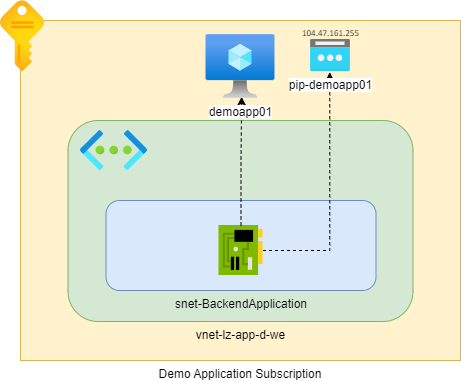
Our beginning situation is as follows. We have a virtual machine which has been deployed to the virtual network ‘vnet-lz-app-d-we’ and has a public IP address ‘104.47.161.255’ called ‘pip-demoapp01’ and is associated to the virtual machine ‘demoapp01’.
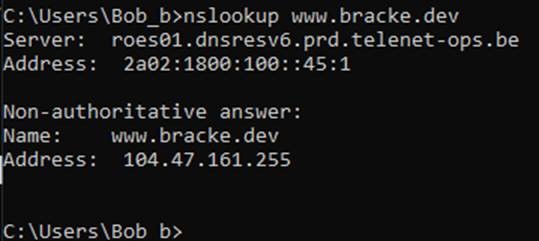
I have created a record ‘www’ in my test DNS Zone ‘bracke.dev’ which points to the ‘104.47.161.255’ IP address of the Virtual Machine:
This Windows Server virtual machines uses an IIS website with a default hello.html document:
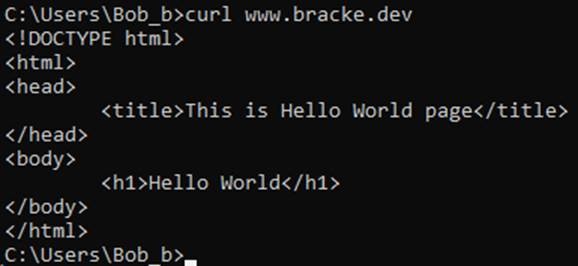
A secondary page ‘agw.html’ has also been created, to easily differentiate between traffic coming through the Application Gateway and through the IIS Webserver.
To-be situation
What we would like to achieve is hosting our website in a more secure manner. First, we would like to remove the Public IP resource which is associated to this virtual machine. If this were not possible, because you do not have a Bastion host or you have no means to privately connect to your Azure networks and resources, we would at the very least like to be able to restrict RDP access to this virtual machine from a well-known Public IP Address.
Secondly, we will implement an Application Gateway, this is one of Microsoft’s reverse proxy solutions. When deployed with a WAF or WAFv2 sku, the Application Gateway receives the Web Application Firewall (WAF) capability to detect web application vulnerabilities and common exploits based on OWASP Rule sets (3.0,3.1 or 3.2). The WAF features increase security for your web applications tremendously, allowing it to filter and block commons attacks such as XSS and SQL Injection.
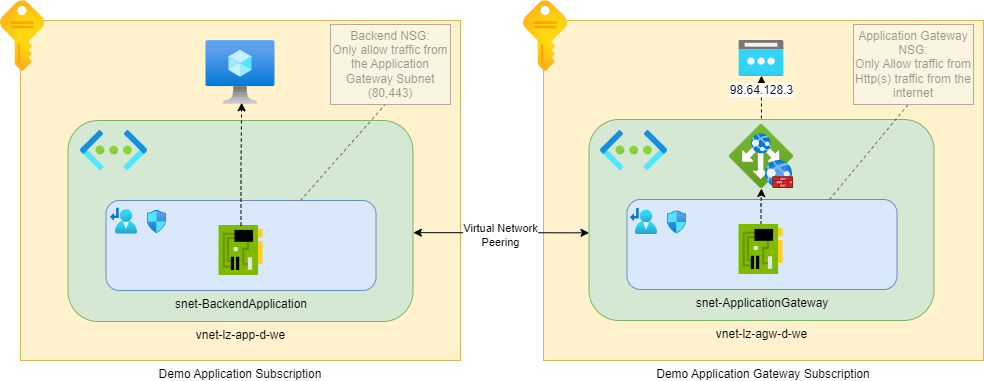
Migration procedure for an Application Gateway Architecture
Application Gateway Setup
The configuration, for demo purposes, is rather simple. We have an application gateway with WAFv2 sku, integrated in the virtual network ‘vnet-lz-agw-d-we’ and is configured with a Public IP address ‘98.64.128.3’. The AGW’s and virtual machine’s networks are peered, meaning they are able to communicate directly. In a real production environment the preferred solution would be to integrate both virtual networks in a Hub-Spoke topology where all traffic is routed through a central Azure Firewall or other Network Virtual Appliance (NVA) Firewall. However, for the sake of this demo, a direct peering between the AGW and Backend Application virtual networks is created.
Let’s go ahead and configure our Application Gateway, here is a quick overview:
- Choose or create a new Public IP address
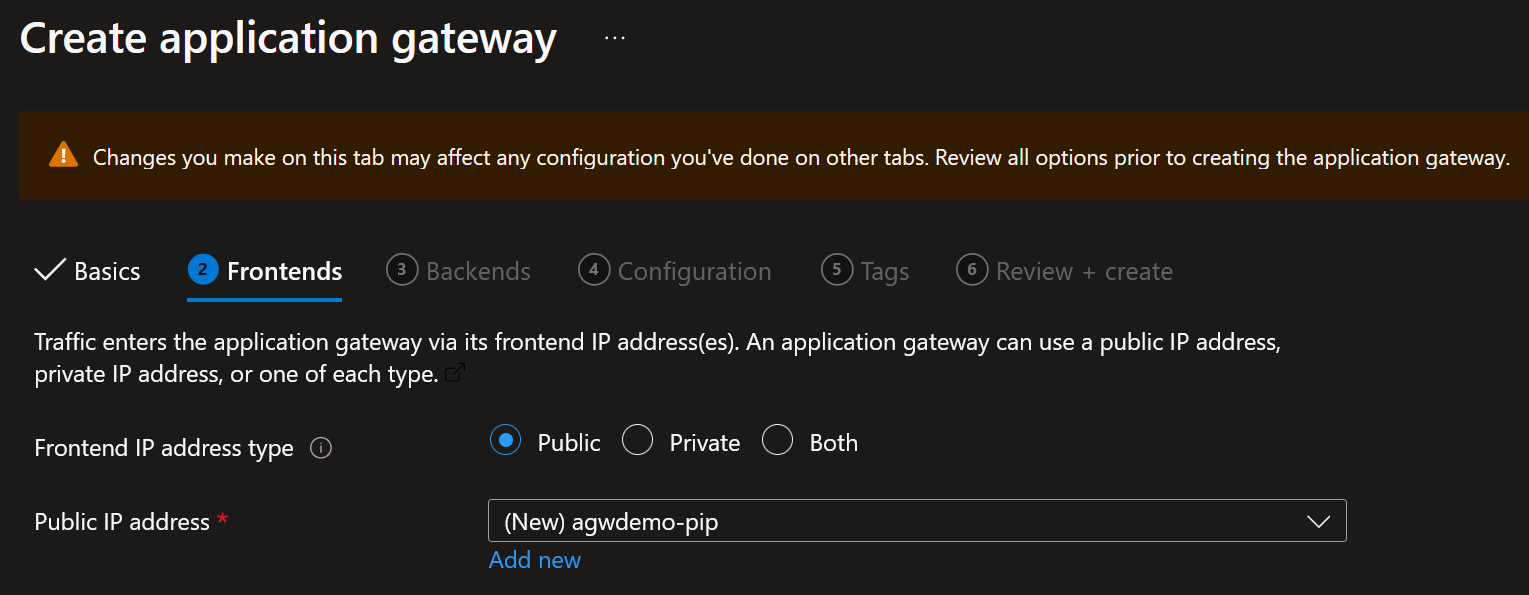
If you want to create a private listener, be sure to select ‘Private’ or ‘Both’ - Create a backend pool with the private IP address of the Backend Application Virtual Machine
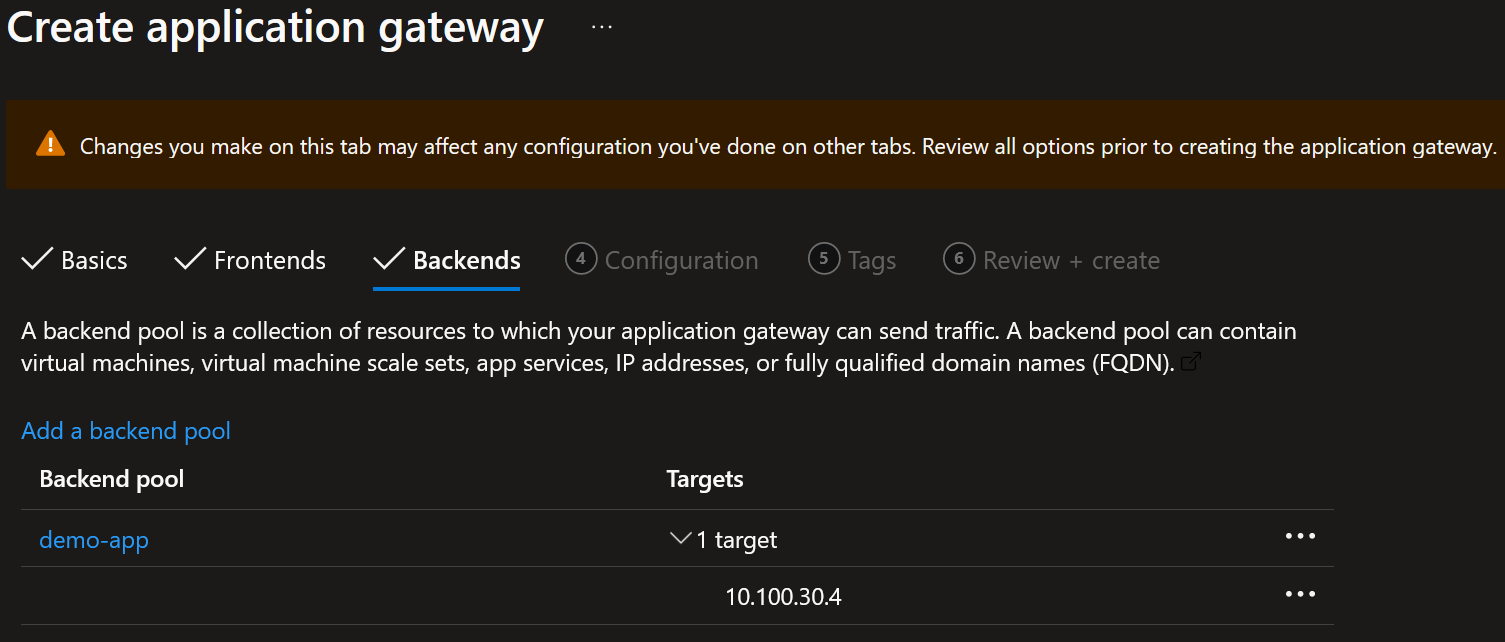
- Configure a routing rule which will route traffic on the www.bracke.dev hostname to the demo-app backend pool.
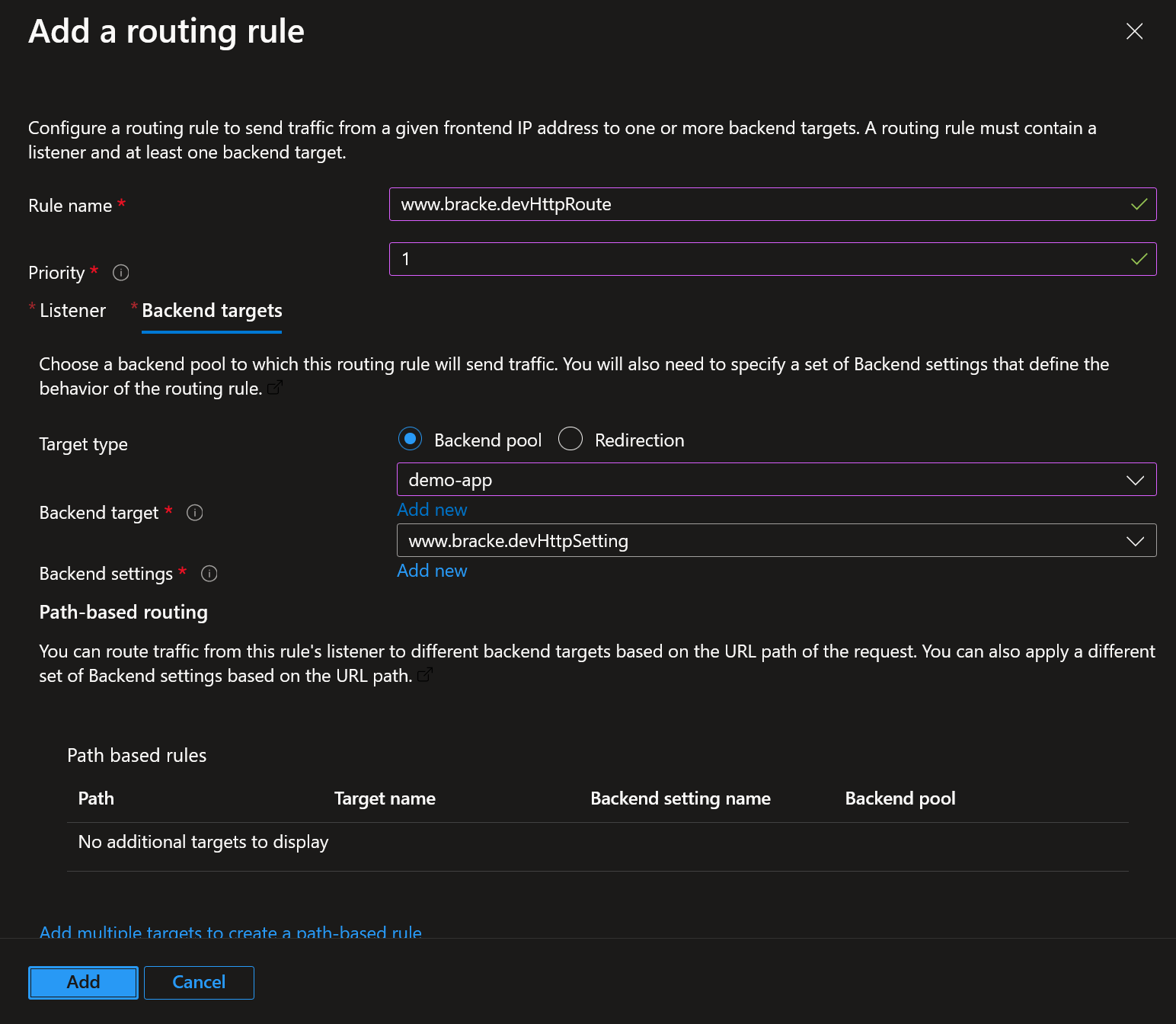
- The routing rule in step 3 also configured the backend settings used by the listener in the following way:
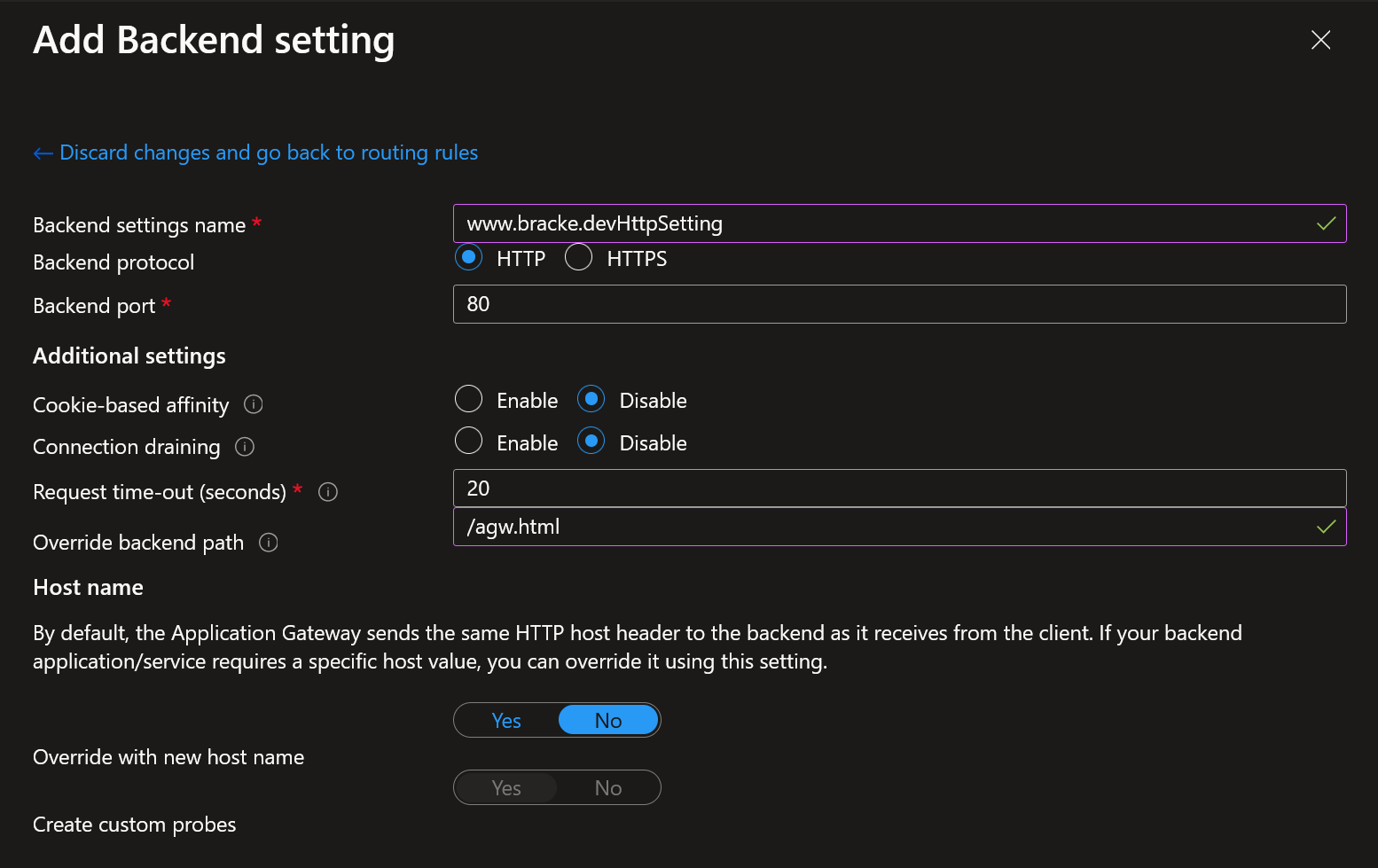
As you can see, we override the backend path with /agw.html. This allows us to easily differentiate between direct VM routing and AGW routing.
After finalizing the above steps, we are ready for testing.
Testing the setup before migration
Now, how do we actually test our new implementation, without switching our DNS records to point to the new application, possibly incurring downtime on the workload? And what do we actually test?
Host File route
When we curl www. Bracke.dev, we will get routed to the default document on the IIS website:
To be able to test our new architecture effectively, we will have to fiddle with our hosts file. Start the Notepad application as Administrator and open up the following path: c:\Windows\System32\Drivers\etc\hosts . Adding the following line will allow us to be able to test our configuration without actually swapping our DNS entry:

This will route our local traffic for www.bracke.dev to the Application Gateway Public IP Address defined in the new route instead of to the current virtual machine public IP address. This is quite a nifty trick which allows you or developers to be able to conduct functional tests without actually migrating to our Application Gateway architecture.
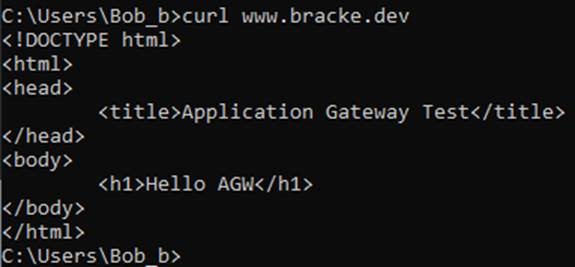
When we now curl www.bracke.dev again, we can see that we get routed through the Application Gateway, because we have configured the /agw.html path in the AGW Listener:
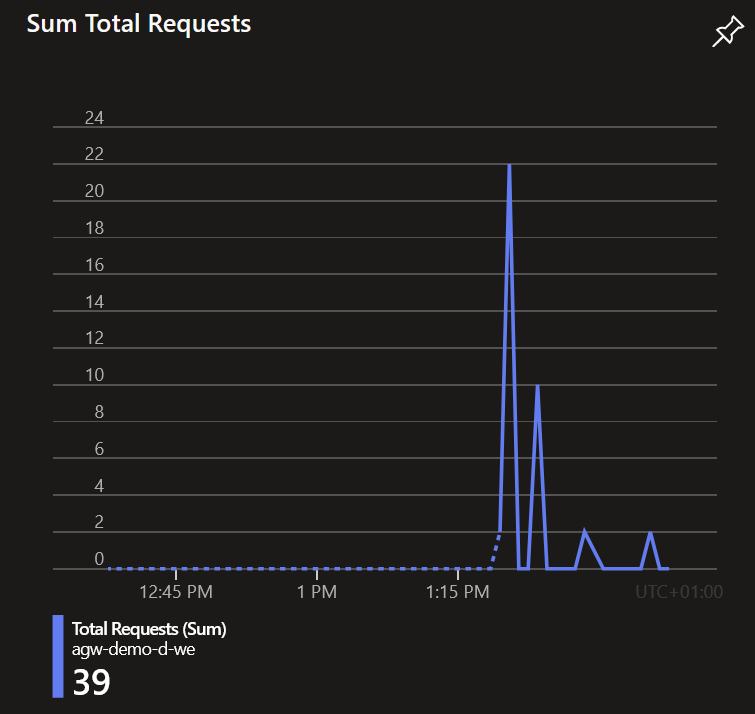
On the overview page of our Application Gateway we see the requests coming in:
Private Listener approach
An alternative method would be to create a private listener instead of a public one. This approach however requires you to have private connectivity towards your Application Gateway. Creating a private listener for testing purposes might be more suited solution for organizations which are more mature in their cloud adoption journey. I will not explain this approach in grave detail, but keep in mind that this is a fine way to test as well.
The idea here is that you would expose the application only to the private network part of the organization, so not yet publicly to the entire Internet. Using an internal private DNS records to host the Application Gateway Listener does not require you to fiddle with the hosts file. In doing so, multiple engineers can communicate to the solution without all having to make changes to their own device, allowing for testing on a bigger scale.
Routing issues
When encountering network related issues, there’s a couple of tools to help you troubleshoot the problem. First, let us check the backend health of our Application Gateway. This is an easy way to quickly see if our virtual machine is accessible by the AGW. If there were to be any issues, such as an NSG or firewall blocking the connectivity, it will be shown here. Additionally, backend health will also show if there are any issues with certificates used on the Application Gateway or on the backend server.
Finally, using the ‘connection troubleshoot’ feature of Application gateway can make the troubleshooting less complex and cumbersome. This is an amazing tool to be able to quickly pinpoint any issues. When any potential issues are resolved, we can head over to the next step.
Web Application Policies
Thoroughly troubleshooting our WAF Policies plays a vital role in the success of the migration, you should enable Diagnostic Settings on your application Gateway. This will allow you to see what requests are received by the AGW and which WAF Rules are causing issues. I have configured the following Diagnostic Settings:
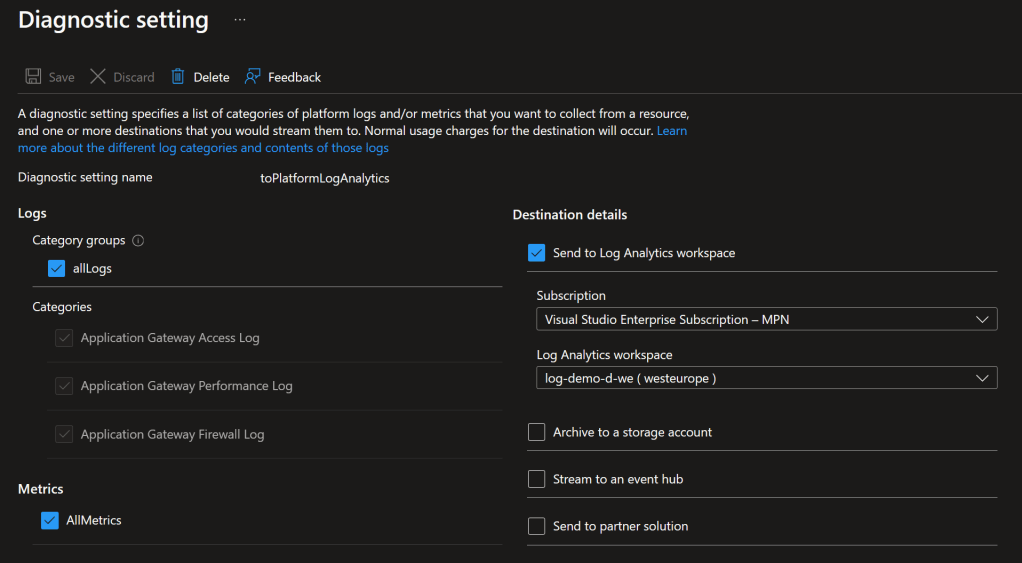
I advise to set the WAF Policy Mode to ‘Protection’. As this will point out issues with OWASP Rules rather quickly, a blocked rule will impact the application. Consulting the logs, more specifically the ‘ApplicationGatewayFirewallLog’ category will allow for quicker identification and resolution of blocking OWASP rules. An introduction to exploring the aforementioned category can be found here: https://learn.microsoft.com/en-us/azure/application-gateway/log-analytics. A potential solution to resolve a blocking OWASP Rule is to disable that specific rule, or to create and exclusion. The latter however, is not always as easy to achieve.
Let developers or testers validate previously working functionalities on the website. Results will quickly show if everything is working as intended. When testers experience any issues, make use of the logs available in the Log Analytics workspace, as this will be an easy way to identify the underlying issue.
Migration
The migration in itself is rather easy. A quick change of the ‘www’ DNS entry in the public DNS Zone ‘bracke.dev’ from the public IP address of the virtual machine to the public IP address of the Application Gateway, will do the trick:
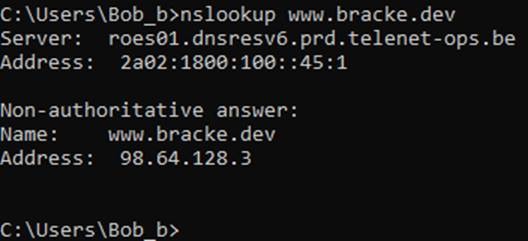
If we now head over to www.bracke.dev we will be able to reach the webserver through the Application Gateway:
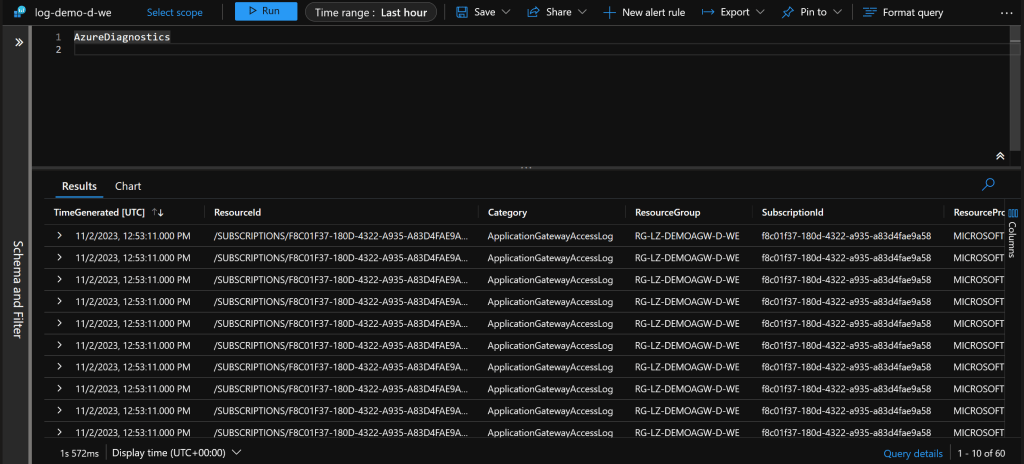
We can also see the requests coming in through the diagnostic settings configured:
Finally, do not forget to clean up the hosts file!
If you have other means to privately connect to the virtual machine, you can go ahead and remove the ‘old’ Public Ip address. If this is not feasible, you can create a new inbound rule on the Network Security Group which is associated to the Backend Application. This rule should restrict RDP access to the virtual machine to only allow access when the source is a well-known Public Ip Address from the organization.
Conclusion
As shown in the blog post, migrating to an Application Gateway architecture increases the security posture of the complete application. Not only by being able to filter common Application vulnerabilities using WAF Policies. But also by reducing the public ports the virtual machine exposes on the Internet.
Both adapting the hosts file and creating a private listener offer a great and easy way to test your migration to Azure Application Gateway. Choosing what approach you will take, depends on the maturity of the customers Azure environment, and what their ambitions are.
Finally, fully testing the new architecture is of grave importance for a successful migration. Not fully testing, or not testing the right way will leave you vulnerable for issues and a rollback might be needed. Be sure to use the tools provided by Microsoft such as the Backend Health or the Connection Troubleshoot features of the Application Gateway. Ideally, you would start to incorporate the WAF Policies feature of the Application Gateway. Be sure to thoroughly test this, and validate the functionality of the application with people who know the application inside out.
 Mostly Cloud
Leave a comment